Introduction
The way enterprise buyers evaluate products has changed dramatically.
Today’s procurement leaders, category managers, and wholesale decision-makers do not want to wait for sales calls before accessing critical information. Many prefer to research independently, compare options digitally, and shortlist vendors before speaking with a representative.
This shift is especially visible among younger purchasing professionals who expect the same intuitive digital experiences they encounter as consumers. They want immediate access to specifications, pricing structures, certifications, demonstrations, and product comparisons.
As a result, your digital presence is no longer just a marketing asset. It has become a critical part of your sales infrastructure.
An expertly engineered B2B Virtual Showroom Design environment allows prospects to explore products, validate purchasing decisions, and engage stakeholders across multiple locations without scheduling a physical visit.
When designed correctly, it functions as a front-line sales asset that operates continuously, helping you generate qualified opportunities while reducing friction throughout the buying journey.
Learn why virtual try-on is an eCommerce expectation.
Evolution of the Virtual Showroom
Enterprise digital selling has evolved far beyond downloadable brochures and static product catalogs.
For years, B2B organizations relied on PDF presentations, image galleries, and spreadsheet-based product lists to communicate value. While these tools delivered information, they rarely created engagement.
Buyers were forced to navigate disconnected resources, making it difficult to visualize products in real-world applications.
The next phase introduced interactive websites and digital catalogs. These experiences improved accessibility but still lacked the contextual understanding that complex enterprise purchasing often requires.
Today, the market is rapidly moving toward browser-based spatial experiences powered by real-time rendering, 3D visualization, and interactive collaboration technologies.
A modern B2B virtual showroom combines product discovery, technical validation, stakeholder collaboration, and sales engagement within a single digital environment. This transition reflects broader shifts in buyer expectations.
Business purchasers increasingly expect the same convenience they experience when shopping as consumers. They want intuitive navigation, instant information access, visual product exploration, and frictionless communication channels.
At the same time, they require industrial-grade capabilities such as bulk ordering workflows, account-specific pricing, inventory visibility, technical documentation, and compliance verification.
The organizations winning today are not simply displaying products online. They are creating digital destinations where buyers can confidently evaluate solutions, engage internal stakeholders, and advance purchasing decisions faster.
Understand how virtual try-on reduces return rates for jewelry and watches.
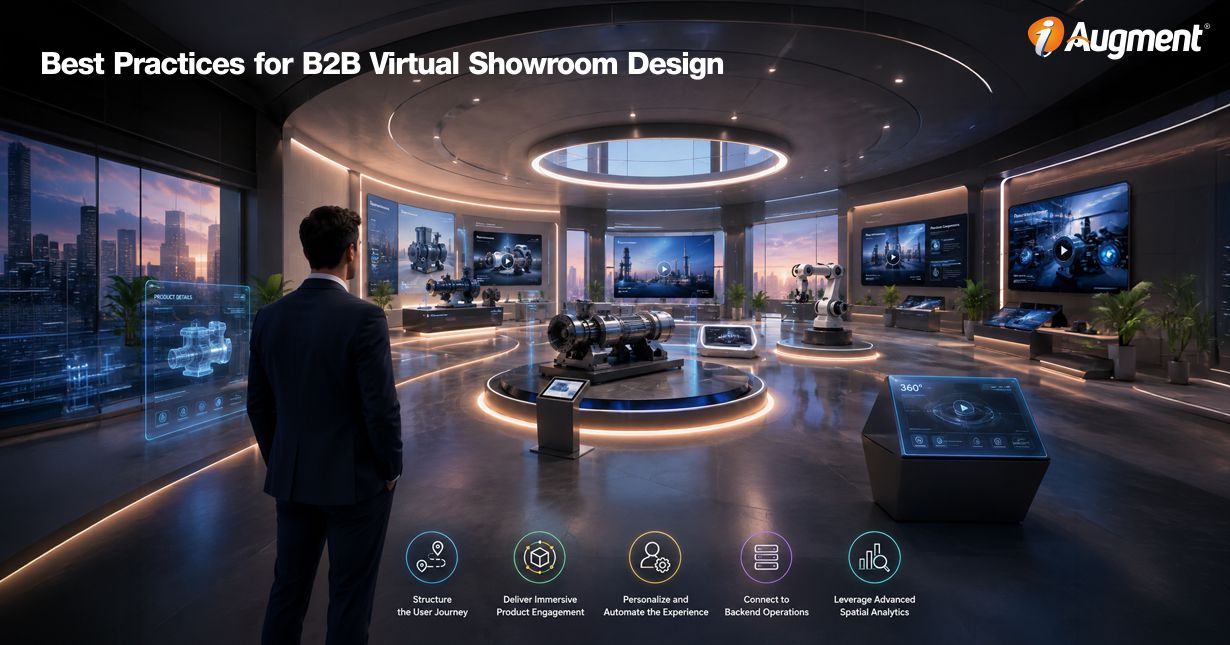
Best Practices for B2B Virtual Showroom Design
Successful virtual showroom design requires more than attractive graphics. High-performing environments combine intuitive navigation, immersive product exploration, operational connectivity, personalization capabilities, and measurable business intelligence.
Together, these elements create a digital sales ecosystem capable of supporting enterprise purchasing journeys from discovery through conversion.

1. Structure the User Journey
The most effective spatial environments guide visitors through a carefully orchestrated path rather than leaving exploration entirely to chance.
1.1. Plan for a Seamless Flow
Enterprise buyers often arrive with specific goals. Some want technical documentation. Others want product comparisons, pricing insights, or deployment examples. Your environment should accommodate both structured and exploratory behavior.
Create logical room-to-room pathways that mimic how sales representatives would guide prospects during an in-person presentation. Product categories should progress naturally. Related solutions should be grouped together. Navigation should remain intuitive regardless of how large the environment becomes.
One of the most important best practices for designing virtual spaces is reducing cognitive load. Buyers should always know where they are, where they can go next, and how to return to previous areas.
1.2. Keep CTAs in Constant Sight
Many organizations invest heavily in visual experiences but fail to create clear conversion paths. Every showroom should maintain visible opportunities for action throughout the visitor journey.
Examples include:
- Request Bulk Quote
- Schedule Technical Consultation
- Download Product Specifications
- Add to Sample Order
- Contact Account Representative
- Request Distributor Pricing
Rather than forcing visitors to search for conversion opportunities, anchor primary actions directly within the viewpoint interface. Persistent CTA placement reduces friction and shortens the path from product discovery to sales engagement.
Discover how to choose the right 3D development company in India.
1.3. Provide an Accessible Fallback
Not every buyer wants a fully immersive experience. Some users may be accessing your platform from slower networks. Others may need immediate access to a specific product without navigating a spatial environment.
A structured 2D index view provides a valuable alternative.
This view should include:
- Product categories
- Search functionality
- Filters
- Quick specification access
- Downloadable resources
- Direct ordering options
The strongest B2B self-service virtual showroom blueprint accommodates both immersive explores and transactional buyers without sacrificing usability for wither audience.

2. Deliver Immersive Product Engagement
A virtual environment succeeds when buyers feel confident about evaluating products, without physically touching them. Your objective is to eliminate uncertainty.
Every design decision should help visitors understand how products look, function, perform, and fit within their operational requirements.
2.1 Utilize Interactive Hotspots
Interactive hotspots transform passive product viewing into active product investigation. Rather than forcing buyers to search through multiple pages, embed information directly within the 3D experience.
When users click on a product, they should instantly access:
- Technical specifications
- Material composition details
- Manufacturing certifications
- Compliance documentation
- Performance benchmarks
- Bulk pricing structures
- Product comparison tools
- Maintenance requirements
The best implementation reveals information contextually, allowing users to remain immersed while gathering critical purchasing data.
Find out how stacking increases the average order value for jewelry.
2.2. Integrate AR and 3D Modeling
High-fidelity digital twins are becoming a core requirement for enterprise product visualization. Buyers want more than music renders. They want realistic representations that accurately communicate dimensions, finishes, configurations, and functionality.
Interactive 3D models allow visitors to:
- Rotate products freely
- Zoom into specific components
- View internal assemblies
- Switch between product variations
- Examine material finishes
- Explore optional accessories
For industrial manufacturers, equipment suppliers, and wholesale distributors, augmented reality ads another layer of value.
Using a mobile device, buyers can place virtual products into real-world environments and assess scale compatibility, spatial fit, workflow impact, and facility integration potential.
2.3 Embed Rich Supporting Media
Not every product question can be answered through 3D visualization alone. Supporting content helps bridge the gap between visual exploration and technical validation.
Consider integrating:
- Product demonstration videos
- Installation walkthroughs
- Engineering blueprints
- CAD downloads
- Technical manuals
- Industry certifications
- Case studies
- Performance reports
All supporting resources should be accessible without forcing users to leave the showroom environment. This creates a cohesive evaluation process where every piece of information is available exactly when buyers need it.

3. Personalize and Automate the Experience
Enterprise buyers do not all have the same needs. A distributor, reseller, procurement manager, and operations executive may view the same product through completely different lenses
Personalization transforms a generic showroom into a dynamic sales channel that adapts to each audience segment.
Learn the benefits of virtual showrooms for furniture industry.
3.1. Enable Guided Group Sessions
Complex B2B purchases rarely involve a single decision-maker. Multiple stakeholders often participate, including procurement leaders, technical evaluators, operations managers, financial reviewers, and executive sponsors.
Shared virtual walkthroughs help bring these participants together regardless of location.
Spatial collaboration features can allow:
- Multi-user attendance
- Real-time voice communication
- Guided product demonstrations
- Live annotations
- Interactive Q&A sessions
- Group document reviews
Sales representatives gain the ability to conduct immersive presentations while addressing technical questions in real time.
This creates a more engaging alternative to traditional video conferencing and slide-based presentations.
3.2. Always Offer Instant Live Assistance
Even highly autonomous buyers occasionally need expert guidance. A complex compliance question, technical requirement, or deployment concern can create hesitation that stalls momentum.
Immediate assistance options help prevent abandonment. Examples include:
- Live chat modules
- Video consultation triggers
- Technical support requests
- Direct account manager access
- Meeting scheduling tools
Support mechanisms should remain accessible throughout the environment without disrupting the user’s exploration process. Organizations that blend self-service discovery with rapid expert access often achieve stronger engagement outcomes and shorter sales cycles.

4. Connect to Backend Operations
A visually impressive showroom delivers limited business value if it operates independently from your core systems. The most successful implementations function as extensions of the enterprise technology ecosystem.
4.1. Centralize Data Architecture
Product information changes constantly. Specifications evolve. New assets are available. Pricing structure shifts. Compliance documents are updated. Maintaining consistency across channels requires centralized content governance.
Connect your showroom directly to:
- Product Information Management (PIM) platforms
- Digital Asset Management (DAM) systems
- Content repositories
- Product databases
This approach allows information updates to propagate automatically throughout the environment. Instead of manually updating hundreds of showroom assets, teams manage content from a centralized source of truth.
4.2. Keep Channels in Perfect Sync
Inventory visibility plays a critical role in buyer trust. Nothing damages credibility faster than showcasing products that cannot be purchased. Ral-time synchronization with ERP system allows buyers to view:
- Current stock levels
- Product availability
- Lead times
- Regional inventory positions
- Dynamic pricing information
When operational systems and visual experiences remain aligned, buyers gain confidence that the information they see reflects actual business conditions. This operational accuracy supports more productive conversations and reduces friction during order processing.

5. Leverage Advanced Spatial Analytics
One of the greatest advantages of digital environments is visibility into buyer behavior. Physical showrooms rarely provide detailed insight into how visitors engage with products. Virtual environments generate measurable intelligence on a scale.
Understand how virtual showrooms generate more quality leads.
5.1. Track Visitor Behavioral Metrics
Spatial analytics reveal patterns that traditional web analytics often miss.
Key measurements may include:
- Navigation paths
- Visitor movement patterns
- Hotspot interaction rates
- Product engagement duration
- Room visitation frequency
- Exit locations
- Repeat visits
- Conversion activity
These behavioral indicators help identify products attracting the most interest and areas where visitors encounter friction. The most advanced organizations use this data to uncover emerging demand signals before they appear in sales reports.
A sophisticated virtual product presentation strategy combines immersive engagement with actionable behavioral intelligence.
5.2. Continuously Refine and Optimize
The highest-performing virtual showrooms evolve continuously. Rather than treating launch as the finish line, leading as the finish line, leading organizations view it as the beginning of an optimization cycle.
Regular experimentation can evaluate:
- Layout configurations
- Product placement
- Navigation structures
- Lighting environments
- CTA positioning
- Messaging variations
- Content hierarchy
- Interactive feature adoption
This iterative process represents one of the most important best practices for designing virtual spaces because buyer expectations continue to evolve. Small improvements compounded over time can produce meaningful increases in engagement, quote requests, and qualified opportunities.
Study how to implement visual commerce as a conversion optimization strategy.
Conclusion
Enterprise buyers increasingly expect the freedom to research, evaluate, and validate solutions on their own terms. Organizations that continue relying solely on traditional sales presentations risk falling behind competitors that offer richer digital buying experiences.
A successful virtual showroom is far more than a visual showcase. It combines intuitive navigation, immersive product exploration, intelligent personalization, operational connectivity, and measurable analytics into a unified revenue-driving platform.
When executed strategically, a virtual showroom becomes an always available sales environment that supports buyers throughout every stage of the purchasing journey. The result is stronger engagement with higher-quality opportunities, improved buyer confidence, and a more predictable path to revenue growth.