Introduction
Luxury shopping has changed dramatically over the last few years. Your customers no longer judge your brand only by the products you sell. They judge every digital interaction. They expect premium experiences that match the quality of your craftsmanship, even when shopping from home.
That creates a challenge. A diamond ring, luxury watch, or designer bracelet is a high value purchase that customers traditionally wanted to see, wear, and compare in person. Static product images rarely provide the confidence needed to complete that decision.
Interactive visualization bridges this gap. By allowing shoppers to preview products on themselves before buying, luxury retailers can recreate much of the confidence associated with an in-store consultation while keeping the convenience of online shopping.
Understand why virtual try-on is no longer a feature but an eCommerce expectation.
What is Virtual Try-On Technology?
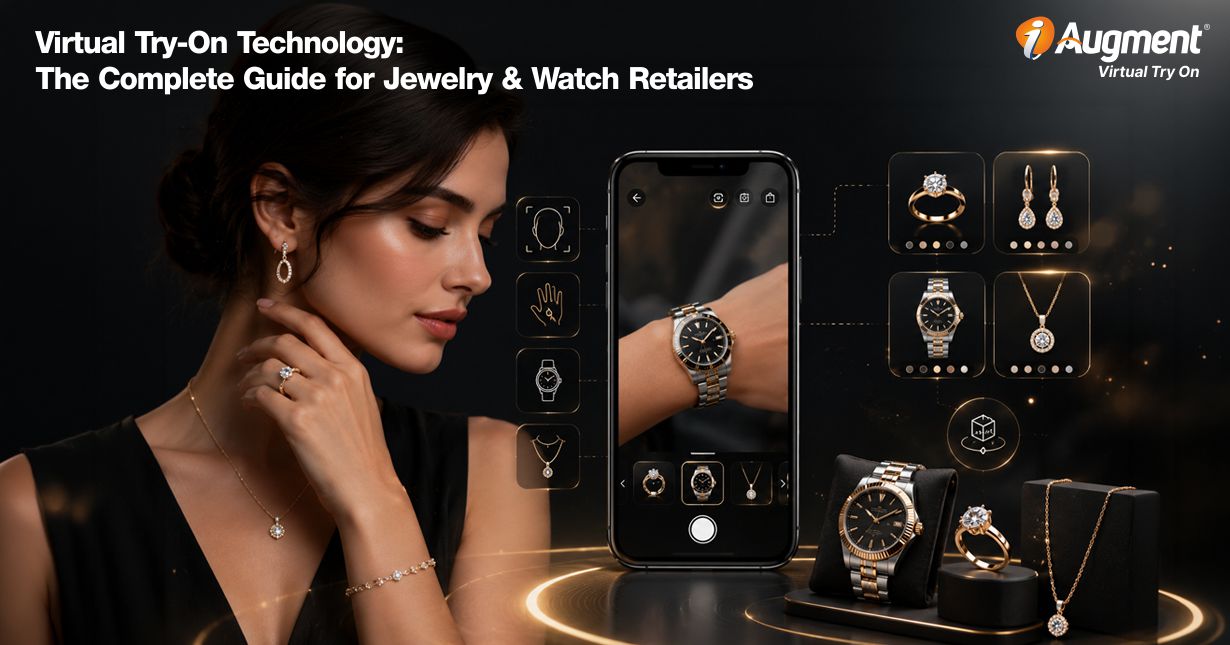
Imagine a customer browsing your luxury watch collection during lunch break. Instead of scrolling through dozens of product photos and trying to guess how a 2mm case might look on their wrist, they click a single button.
Their laptop camera activities instantly. Within seconds, the selected watch appears naturally on their wrist, moving with every gesture as if they were wearing the real product. That is the experience delivered by virtual try-on technology.
Rather than asking shoppers to imagine how an item might look, the system allows them to visualize it directly on themselves using their phone, tablet, or desktop camera. They can rotate their wrist, compare finishes, experiment with different collections, and make decisions with far greater confidence.
For luxury retailers, this transforms online shopping from passive browsing into an interactive buying experience. Customers spend less time second-guessing their purchase ans more time discovering products that genuinely match their personal style.
The result is a shopping journey that feels engaging, informative, and remarkably close to visiting a premium showroom.
Ready to Bring Luxury Shopping to Life?
How Does Virtual Try-On Technology Works?
Although the experience feels almost effortless, several sophisticated technologies work together behind the scenes to create a realistic preview.

1. Real-Time Camera Integration
The process begins when the shoppers grants camera access through a standard web browser. Modern browsers capture high-resolution video with very little delay, allowing the system to process movement almost instantly without requiring additional hardware.

2. Spatial Mapping of Facial and Body Features
Once the camera is active, computer vision algorithms identify important anatomical landmarks. Depending on the product category, the system detects wrist contours, finger joints, ear positions, facial geometry, or neck alignment.
These reference points provide the foundation for accurate product placement.

3. High-Fidelity Digital Overlay of Products
The selected product is represented by a highly detailed 3D digital twin. This model is positioned according to the tracked body landmarks while maintaining realistic proportions, perspective, and scale. As the shopper moves naturally, the product remains locked in position.

4. Personalization Through Artificial Intelligence
Modern AI models continuously refine the experience by adapting to individual conditions. Skin tone, ambient lighting, camera angle, movement speed, and viewing distance all influence how the product is rendered.
These adjustments create a visualization that feels natural instead of artificial, helping shoppers gain a realistic impression before making a purchase.
Learn how virtual try-on reduces product return for jewelry and watches.
AI Virtual Try-On vs 3D/AR Try-On: Which Is Better for Jewelry Retailers?
Both AI-powered visualization and AR-based virtual try-on solutions have transformed online luxury retail, but they solve different business challenges. Choosing the right approach depends on your objectives, product catalog, and the type of shopping experience you want to deliver.
AI virtual try-on creates realistic product previews by generating new images from customer photos. Instead of relying on live camera tracking, AI analyzes uploaded images and produces photorealistic results that closely resemble professional lifestyle photography.
This makes it an excellent option for marketing campaigns, social media content, and customers who prefer static previews.
3D and AR virtual try-on, on the other hand, delivers a live, interactive experience. Products remain attached to the customer’s wrist, finger, or neck as they move naturally, giving shoppers confidence in size, placement, and overall appearance.
This level of interactivity closely replicates the experience of trying on products inside a luxury boutique.
Feature | AI Virtual Try-On | 3D/AR Virtual Try-On |
Customer Experience | Static image generation | Live interactive visualization |
Real-Time Tracking | No | Yes |
Product Accuracy | High | Very High |
Size Visualization | Limited | Excellent |
Product Interaction | Static | Dynamic |
Ideal Use Case | Marketing and inspiration | Product evaluation and purchasing |
Best Product Categories | Fashion & accessories, jewelry, watches | Jewelry, watches, eyewear |
For jewelry retailers, the strongest strategy is often combining both technologies. AI-generated previews attract attention during the discovery phase, while live AR experiences help customers evaluate products confidently before purchasing.
Together, they create a seamless buying journey that supports both inspiration and decision-making.
Discover how stacking increases the average order value for jewelry.
Types of Virtual Try-On Technology
Not every virtual try-on solution works the same way. Different technologies serve different retail objectives, product categories, and customer expectations. Understanding these approaches helps you choose a platform that aligns with your business goals.

1. AR-Based Try-On
Augmented Reality has become the preferred choice for premium retailers because it delivers live, interactive visualization through a device camera.
Using luxury retail augmented reality, shoppers can move naturally while watches, rings, bracelets, or necklaces remain accurately positioned in real time. They can inspect products from multiple angles, compare finishes, and experience how each piece complements their appearance before making a purchase.
This approach creates one of the closet digital experiences to trying products inside a physical boutique.

2. Photo-Based Try-On
Photo-based systems offer a simpler alternative.
Instead of activating a live camera, customers upload a photograph of themselves or their hand. The software places a digital product onto the upload image, allowing users to preview different designs without live motion tracking.
Although less immersive than AR, this approach remains effective for customers who prefer browsing at their own pace or who use devices with limited camera capabilities.

3. 3D Body Scanning
For Products where sizing accuracy plays a significant role, 3D body scanning provides an additional layer of precision.
Advanced spatial estimation measures body dimensions with impressive detail, often down to millimeter-level accuracy. For jewelry and watches, this allows retailers to recommend appropriate ring sizes, bracelet lengths, or watch case dimensions based on the shopper’s physical proportions.
Brands offering custom-made or bespoke collections often benefit the most from this technology.

4. AI Generative Try-On
The newest evolution combines computer vision and generative artificial intelligence.
Instead of relying solely on traditional overlays, AI diffusion models can create highly realistic images that depict products as though they were professionally photographed on the shopper. Lighting, reflections, shadows, and surroundings textures blend naturally into the generated result.
As these models continue to improve, luxury brands gain new opportunities to create premium visual experiences that require fewer manual assets while delivering increasingly photorealistic previews.
Study about virtual try-on for watches: a complete guide.
Features of Virtual Try-On (iAugment Specific)
The quality of a virtual try-on solution is determined by far more than its ability to place a product on a customer’s hand or wrist. Enterprise retailers need a platform that delivers realism, speed, scalability, and consistency across every interaction.
Modern engines combine computer vision, artificial intelligence, advanced rendering, and cloud computing to create an experience that reflects the standards of a luxury brand.
Below are the capabilities that separate basic visualization tools from enterprise-grade virtual try-on platforms.

1. Realistic Visualization
For luxury products, visual accuracy is everything. A customer purchasing a diamond ring or premium watch expects to inspect every detail before committing a purchase. If reflections appear artificial or gemstones to look flat, confidence drops immediately.
Modern rendering engines simulate the way light interacts with different materials. Metallic surfaces reflect surrounding light naturally; polished gold displays subtle highlights, and diamonds exhibit brilliance, sparkle, and depth instead of appearing static textures.
This level of realism is particularly valuable for jewelry virtual try-on because shoppers often compare intricate craftsmanship, gemstone cuts, and metal finishes before deciding. High-quality rendering allows customers to appreciate these details without visiting a physical showroom.
The closer the visualization resembles the actual product, the easier it becomes for shoppers to trust what they see.

2. App-Less Browser Interface
Customers value convenience. Asking them to install another application simply to preview a product creates unnecessary friction.
Modern platforms use WebAR technology that runs directly inside browsers such as Chrome, Safari, Edge, and Firefox. A shopper clicks the “Try On” button, grants camera permission, and begins interacting with products within seconds.
This browser-first approach offers several advantages:
- Faster customer adoption
- Lower abandonment rates
- No software downloads
- Compatibility with existing eCommerce websites
- Simple updates managed by the retailer
For enterprise brands, this also reduces development costs because a single deployment works across multiple devices instead of maintaining separate mobile applications.

3. Multi-Asset Stacking
Luxury purchases rarely happen in isolation. Customers often want to understand how multiple accessories look together before placing an order. Advanced visualization engines allow several products to appear simultaneously on the same customer.
Examples include:
- Stacking multiple engagement rings to choose the best one
- Wearing multiple fashion rings on different fingers
- Seeing different bracelets together to find the best
- Trying multiple ear studs and hoops together
The system tracks each accessory independently while maintaining proper spacing and perspective. As the customer moves naturally, every item remains accurately positioned.
This capability encourages product discovery and naturally supports cross-selling by allowing shoppers to build complete luxury collections instead of purchasing individual items.

4. Cross-Device Compatibility
Today’s customers shop everywhere. They may begin browsing on a desktop during work, continue on a tablet while relaxing at home, and complete the purchase from a smartphone. An enterprise virtual try-on platform should deliver a consistent experience regardless of device.
Modern solutions support:
- iPhone
- iPad
- Android smartphones
- Android tablets
- Windows laptops
- macOS computers
Cloud rendering and responsive design automatically adjust graphic quality according to available processing power while maintaining smooth interaction. For retailers, this creates one unified customer experience across every digital sales channel.
Build a Luxury Shopping Experience Customers Remember

5. Multiple Watch Variations
Luxury watch buyers rarely compare only one configuration. They often want to explore several combinations before selecting their preferred model.
Advanced engines allow customers to try-on different variants of the same watch. Instead of restarting the visualization every time, shoppers simply switch between available options while the product remains on their wrist.
This makes watch AR try-on significantly more engaging because customers can evaluate numerous premium combinations within minutes while maintaining the same viewing angle and wrist position.
The faster customers can compare configurations, the easier it becomes to identify their preferred design.
Learn how to integrate iaugment virtual try-on with eCommerce platform.

6. Real-World Object Comparison
Judging size from product dimensions alone can be surprisingly difficult. A 40 mm watch case or a one-carat diamond means little to many shoppers without visual context.
Modern platforms solve this challenge by introducing familiar reference objects alongside the virtual product.
Examples include:
- Credit cards
- Coins
- scale
- House keys
Displaying recognizable items next to luxury products provides immediate scale awareness. Instead of interpreting technical measurements, customers instantly understand how large or small a product appears in real life.
This additional context reduces uncertainty during purchasing decisions.

7. Side-by-Side Product Comparison
Luxury purchases involve careful evaluation.
Customers frequently compare:
- White gold versus yellow gold
- Oval versus round diamonds
- 38 mm versus 42 mm watch cases
- Matte versus polished finishes
Modern interfaces allow two products to appear simultaneously within a split screen. Rather than switching repeatedly between product pages, shoppers can evaluate differences immediately.
This speeds up decision-making while creating a more informative buying experience. Retailers also gain valuable behavioral insights by understanding which products customers compare most frequently.

8. Automated Visual Auto-Capture
Many shoppers enjoy sharing their virtual try-on experience with friends and family before making a purchase. Capturing the perfect screenshot manually, however, is often frustrating. AI-powered auto-capture removes this challenge.
The system continuously evaluates factors such as:
- Hand stability
- Camera focus
- Lighting quality
- Product visibility
- Viewing angle
When all conditions meet predefined quality standards, the software automatically captures a high-resolution image. Customers receive a polished photo ready for sharing across messaging apps or social media without needing multiple attempts.
This naturally increases brand exposure through user-generated content.

9. Instant Background Removal
Home environments vary dramatically. Some customers stand against plain walls while others browse from busy offices, cafés, or living rooms. Background clutters can distract attention from premium products.
Modern segmentation models isolate the customer’s hand, wrist, face, or upper body from the surrounding environment. The product remains sharply visible while unnecessary visual distractions disappear.
Retailers may choose:
- Transparent backgrounds
- Neutral studio colors
- Soft gradient backdrops
- Branded presentation environments
This creates a premium presentation regardless of where the customer is located.

10. Complete Multilingual Support
Luxury brands serve customers across international markets. An enterprise platform should provide localized experiences without requiring separate implementations.
Modern systems support:
- Interface translations
- Product labels
- Instructional overlays
- Camera guidance
- Error messages
- Accessibility features
Localization helps shoppers interact confidently in their preferred language while maintaining a consistent premium brand identity worldwide. This capability becomes increasingly valuable for retailers to expand into multiple global markets.

11. Real-Time Dial and Hand Synchronization
Luxury watch visualization benefits from one particularly impressive capability. Instead of displaying a static watch face, advanced platforms synchronize the virtual watch with the user’s actual local time.
Every second, minute, and hour hand updates dynamically. This small detail has a surprisingly large psychological impact. Customers subconsciously perceive the watch as a functioning product rather than a decorative image.
Combined with accurate reflections and realistic materials, real-time synchronization significantly enhances immersion and product authenticity.
Discover how virtual try-on enhances product discovery and boosts average order value.

12. Viewport Split Feature
Many times users want to compare two different watches, bracelets, earrings, rings, and necklaces simultaneously. This happens when they like 2 or 3 items but want to finalize one for the purchase.
The split feature helps them with this. It allows them to view two items of the same category on themselves simultaneously so they can have clarity about which one to buy. This feature can also work as an average order value boosters as some customers might buy two items at once.
Benefits of Virtual Try-On
For enterprise retailers, adopting a virtual try-on solution is not simply a technology upgrade. It is a strategic investment that influences customer confidence, operational efficiency, and long-term revenue growth.
When integrated correctly, it improves the shopping experience while supporting measurable business objectives across marketing, sales, and customer retention.

1. Enhancing Customer Confidence
Luxury purchases often involve careful consideration. Customers want to know whether a watch suits their wrist size or if a ring complements their hand before placing an order.
Virtual try-on removes much of this uncertainty by allowing shoppers to see products on themselves in real time. Instead of relying solely on studio photography or product dimensions, they gain a realistic preview that supports informed buying decisions.
As confidence increases, hesitation decreases. Customers are more likely to proceed to checkout because many of their questions have already been answered visually.

2. Reducing Costly Product Returns
Returns remain one of the biggest operational expenses for online retailers, especially within luxury categories.
Many returns happen because customers purchase multiple variations with the intention of keeping only one. Others discover that a product looks different from what they expected.
Virtual try-on helps reduce these situations by setting realistic expectations before the purchase is made. Customers can compare products, evaluate proportions, and understand how each piece looks on them before completing the transaction.
Fewer unnecessary returns translate into lower shipping costs, reduced inventory handling, and stronger profit margins.

3. Boosting Online Conversion Rates
Many online visitors browse products without taking the next step. Interactive visualization changes passive browsing into active participation.
Instead of scrolling through catalog pages, customers begin experimenting with different products, comparing collections, and visualizing complete looks. This increased involvement often shortens the path to purchase because shoppers become emotionally connected to the products they are viewing.
For luxury retailers, even a modest increase in conversion rate can generate substantial revenue due to higher average order values.
Find out why iAugment virtual try-on is the digital product visualization you need.

4. Increasing Active User Engagement
Search engines increasingly value websites that provide meaningful user experiences. When customers spend more time interacting with products, exploring collections, and comparing options, they naturally remain on your website longer.
Higher engagement can contribute to:
- Longer session durations
- Increased product page interactions
- More pages viewed per visit
- Higher repeat visits
- Greater social sharing
These behavioral signals indicate that visitors find value in your content, supporting stronger organic visibility while creating richer shopping experiences.

5. Promoting Operational Sustainability
Luxury retailers often ship multiple products to help customers make purchasing decisions. Although effective, this approach increases transportation costs, packaging waste, and environmental impact.
Virtual try-on reduces the need for unnecessary shipments by allowing customers to evaluate products digitally before ordering.
Benefits include:
- Lower packaging consumption
- Reduced transportation emissions
- Fewer reverse logistics operations
- More efficient inventory utilization
As sustainability becomes a growing priority for consumers and investors alike, digital visualization supports broader environmental initiatives without compromising the premium shopping experience.

6. Personalizing the Luxury Shopping Journey
No two customers shop in exactly the same way. Some prefer minimalist jewelry, while others enjoy layering multiple accessories. Some compare watch sizes carefully, while others focus on strap materials and finishes.
Virtual try-on allows every visitor to explore products according to their own preferences. Instead of presenting a static catalog, your website becomes an interactive showroom where shoppers create combinations that reflect their individual style.
This personalized experience encourages deeper engagement and stronger emotional connections with your brand. It also answers an important business question many executives ask: how do virtual showroom improve customer retention?
The answer lies in giving customers memorable, interactive experiences that encourage them to return, explore new collections, and build long-term relationships with your brand.
Virtual Try-On ROI: How Much Does It Really Improve Jewelry & Watch Conversions?
Luxury retailers often ask whether virtual try-on delivers measurable business value beyond creating an engaging shopping experience. The answer depends on implementation quality, product presentation, and customer adoption, but the overall business impact can be significant.
When shoppers can visualize luxury products on themselves before purchasing, they spend more time exploring collections, compare multiple options with greater confidence, and make buying decisions with fewer uncertainties.
These behavioral improvements frequently translate into stronger commercial performance.
Some of the most common performance indicators include:
- Higher add-to-cart rates
- Improved product page engagement
- Longer browsing sessions
- Reduced purchase hesitation
- Lower product return rates
- Higher average order values through product bundling
- Increased repeat customer visits
For example, imagine a luxury watch retailer receiving 100,000 monthly website visitors with a 2% conversion rate. If interactive visualization increases conversion to just 2.6%, that seemingly modest improvement results in hundreds of additional monthly orders.
When combined with higher average order values through complementary bracelets or accessories, the financial impact becomes even more substantial.
Retailers should monitor key performance metrics before and after deployment, including conversion rate, customer engagement, session duration, return percentage, and revenue per visitor.
Tracking these metrics provides a clear understanding of how interactive visualization contributes to long-term business growth.
Rather than viewing virtual try-on as a visual enhancement, successful brands treat it as a revenue-generating capability that supports merchandising, customer experience, and digital commerce strategy simultaneously.
Learn how virtual try-on bring jewelry to life.
Application of Virtual Try-On Across Industries
Although luxury jewelry and watches are among the fastest-growing categories, virtual try-on technology is transforming many retail sectors.
1. Eyewear (Glasses Try-On)
Customers can preview prescription glasses and sunglasses using facial mapping technology that aligns frames with their nose bridge, eye spacing, and face shape. This helps shoppers compare frame styles before making a purchase.
2. Fashion and Clothing (Clothing Try-On)
Advanced visualization engines simulate garment draping, fabric movement, and overall fit. Customers gain a better understanding of how clothing may appear from different viewing angles while experimenting with multiple styles
3. Jewelry (Jewelry, Rings, Bracelets, Earrings, Necklaces, and Wedding Rings Virtual Try-On)
Rings, bracelets, necklaces, earrings, and pendants can all be visualized in real time. High-quality rendering allows shoppers to compare gemstones, precious metals, and complete jewelry sets without visiting a physical store.
4. Watches (Watches Try-On)
Luxury watch retailers can display different case sizes and dial designs directly on the customer’s wrist. Buyers gain greater confidence before investing in premium timepieces.
5. Cosmetics and Beauty (Makeup Try-On)
Beauty brands use facial tracking to preview lipstick shades, foundation colors, blush, eyeliner, and eye shadow. Customers can compare multiple products within seconds.
6. Footwear (Shoe Try-On)
Computer vision models analyze foot positioning from top and angled camera views, allowing customers to visualize sneakers, formal shoes, and sandals while walking naturally.
7. Hair and Wigs (Hairstyle Try-On)
Hair visualization tools simulate different hairstyles, lengths, textures, and colors. Customers can explore dramatic transformations before visiting a salon or purchasing hair products.
Know how virtual showroom creates an immersive experience in real estate.
How to Integrate Virtual Try-On on Your Digital Store
Successful deployment begins with careful planning. Choosing the right technology partner and preparing quality digital assets can significantly influence customer satisfaction and long-term scalability.
1. Choosing the Right Integration Partner
Not every platform offers enterprise-grade capabilities.
When evaluating vendors, consider factors such as:
- Browser compatibility
- API flexibility
- Data privacy and security
- Cloud infrastructure
- Rendering quality
- Implementation timelines
- Technical support
- Future product roadmap
Request demonstrations using your own products instead of generic examples. This provides a more accurate understanding of how the platform will perform within your business environment.
2. Preparing Product Assets for Virtual Try-On
High-quality visualization begins with high-quality digital assets.
Retailers should prepare:
- High-resolution images
- Material specifications
- Product dimensions
- Gemstone characteristics
- Surface finishes
- Multiple product variations
Well-optimized assets balance visual quality with fast loading speeds, allowing customers to enjoy smooth interactions without long waiting times.
3. Integrating with Your Store Website
Modern virtual try-on platforms integrate with leading eCommerce ecosystems using lightweight JavaScript libraries and APIs.
Deployment typically involves:
- Uploading optimized product assets.
- Connecting the platform to your product catalog.
- Embedding the try-on widget into product pages.
- Configuring analytics and performance tracking.
- Testing across supported browsers and devices.
- Publishing the feature to customers.
Because most enterprise platforms are cloud-based, ongoing maintenance remains relatively simple while allowing new products to be added quickly.
4. How to Add Virtual Try-On to Your Shopify or Magento Store (Without 3D Models)
Many retailers assume virtual try-on requires thousands of professionally created 3D product models before implementation. Modern AI-powered platforms have changed that assumption.
Today, several enterprise solutions such as iAugment can generate high-quality visualization experiences using existing product photography, or AI-assisted model generation. This dramatically reduces implementation time while making the technology accessible to brands with large product catalogs.
Understand how to implement AI-guided selling in virtual showroom.
A typical implementation process includes the following steps:
Step 1: Audit Your Product Catalog
Identify products that would benefit most from virtual try-on, such as engagement rings, luxury watches, bracelets, or premium collections.
Step 2: Gather Existing Product Assets
Collect available product photographs, dimension specifications, and material information. Even without fully developed 3D assets, these files provide valuable input for AI-assisted visualization and 2D virtual try-on implementation like iAugment.
Step 3: Select a Compatible Platform
Choose a solution that integrates directly with Shopify or Magento through APIs, plugins, webhooks, or lightweight JavaScript components. The platform should support browser-based experiences across desktop and mobile devices.
Step 4: Configure Product Mapping
Associate each catalog item with its corresponding visualization assets, allowing customers to launch the experience directly from individual product pages.
Step 5: Test Across Devices
Verify that tracking, rendering quality, loading speed, and overall usability perform consistently across major browsers and operating systems.
Step 6: Launch and Measure Performance
After deployment, monitor customer engagement, conversion rate, return percentage, and interaction analytics to evaluate business performance and identify future optimization opportunities.
Increase Customer Confidence Before Checkout
Best Practices for Shoppers Using Virtual Try-On
Even the most advanced visualization engine performs better when customers understand how to achieve the best possible results. Retailers should educate users with simple recommendations throughout the shopping experience.

1. Ambient Lighting and Environment
Bright, indirect lighting produces the most accurate visualization. Natural daylight or evenly illuminated indoor environments help cameras detect skin tones and body contours more effectively, resulting in better product placement.
Customers should avoid extremely dark rooms or intense backlighting that may reduce tracking accuracy.

2. Achieving Accurate Sizing
Customers should position their hand, wrist, or face within the on-screen guides before beginning the session. Holding the camera steady for the first few seconds allows the system to calibrate accurately.
Once tracking has been established, natural movement provides the best viewing experience.

3. Combining Pieces
Encourage customers to experiment with. Instead of viewing products individually, shoppers can build complete luxury collections by combining rings, bracelets, necklaces, earrings, and watches.
This not only improves engagement but also helps customers discover complementary products they may not have originally considered.
Discover how to increase online sales via digital showroom.
The Future of Virtual Try-On Technology
Virtual try-on continues to evolve rapidly as artificial intelligence, spatial computing, and computer vision become more sophisticated. Over the next few years, several innovations are expected to redefine digital luxury retail.
- AI-powered recommendation engines will analyze customer preferences and automatically suggest matching accessories based on previous browsing behavior and selected products.
- Multi-angle image processing will improve visualization accuracy by combining several customer photographs into highly detailed three-dimensional representations.
- Nose tracking technology will make premium sunglasses and eyewear visualization significantly more precise through dedicated facial landmark detection.
Virtual try-on platforms will also integrate more deeply with ERP, CRM, inventory management, and customer analytics systems, giving retailers valuable insights into shopper preferences while supporting merchandising decisions.
Looking ahead, the conversation will move beyond visualization alone. Brands will increasingly focus on improving e-commerce retention with VR by creating immersive shopping experiences that encourage repeat visits, stronger brand loyalty, and deeper customer engagement across multiple digital channels.
Conclusion
Luxury commerce is becoming increasingly digital, but customer expectations remain deeply personal. Buyers still want confidence, realism, and meaningful interactions before investing in premium products.
Virtual try-on bridges the gap between physical and digital retail by allowing shoppers to experience products before purchasing them. For enterprise retailers, this creates opportunities to improve customer satisfaction, increase conversions, reduce returns, and strengthen long-term brand relationships.
The brands that invest in interactive visualization today will be better positioned to meet tomorrow’s customer expectations and establish a competitive advantage in the evolving world of digital luxury retail.